

(Last Updated On: )
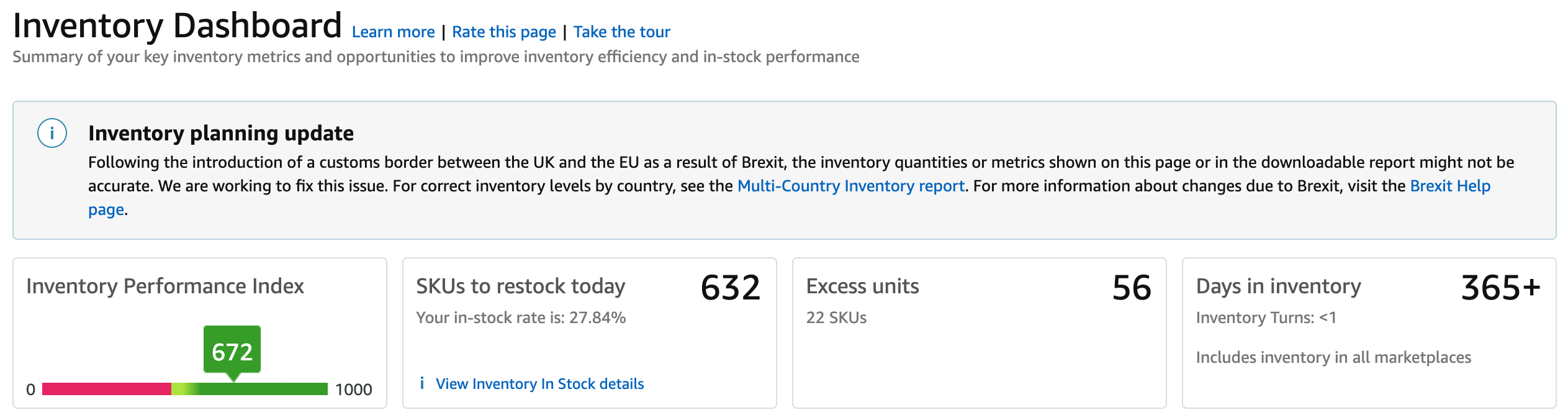
In 2019 Amazon FBA introduced a new dashboard for Amazon FBA sellers to see their inventory’s performance, showing a variety of different metrics. I feel that it’s worth guiding people through this, so they know what they’re looking at and whether or not they should be concerned if their stats don’t appear to be particularly strong.
To be honest, Amazon does their best to let you know exactly why your stats are at the numbers shown; it’s just a matter of you applying this information to guide the way that you choose to buy, send in and price inventory moving forward.
Overall Performance
There’s a 0-1000 scale of your performance. I’ve personally never escaped 620-680, but this value is said to be updated weekly based on your historical performance metrics.
These metrics are as follows:
Excess inventory – the amount of units for which you have over 90 days’ worth of supply for.
Sell-through – the rate at which in-stock inventory sells
Stranded inventory – the inventory received which cannot be sold without an action by the seller
In-stock inventory – the proportion of inventory in-stock (where there is demand)
Storage Monitor
Within the Storage Monitor, Amazon displays the amount of product that you store in a number of different categories: standard size, oversize, clothing and footwear. Each of these has a limit, and it’s up to you to ensure that you sell enough to stay within that range. For the majority of experienced sellers, there are no storage restrictions; it will display that you have Unlimited storage capabilities.
For newer sellers- particularly in Q4 (October to December) – be aware of how much you can store with them, as you always want to stay on their good side.
How to Use This
As I’m primarily an online arbitrage seller (and I expect that most people reading this also are) it’s likely that you are sending in multiple shipments to Amazon each month (unlike private label sellers, where this may be quarterly). This being the case, I would advise that you do a monthly check of your inventory.
With online arbitrage, it can be very difficult to keep your in-stock inventory (simply because so many deals come in and out, and it’s rare that you can keep going back to the same deal for many months). Besides that, you should use your Inventory Performance dashboard to make sure that you keep your product selling. All of the items that linger in your inventory are just adding to your storage fees – this is something you want to avoid as much as possible, as it skims away from your disbursements. Once a month, go through your excess inventory and see whether it’s worth reducing the price of a few of your slow sellers to get them gone and reinvest that cash in something more worthwhile.
There will be those rare products where it’s worth waiting a significant amount of time for the right customer to come along and pay significantly more for an item that you paid for it, but for most of your stock, it’s best to have it in an Amazon fulfilment centre for as short a time as possible – just get that cashflow in.

- NVIDIA’s AI Dominance: Evaluating DataCentre Demand, Competitive Risks, andValuation Sustainability - July 1, 2026
- Controlling Power From Anywhere in the World - September 16, 2025
- From Flat Sheet to Strong Box: How Smart Design Stops Damage - August 28, 2025


